Filling out the web Port Authorisation Form
Page 1 - Customer Details
On the first page the mandatory fields are:
- Dealer Code: Must be a valid Telecom Dealer code. Choose the right Dealer Code for mobile vs. landline connections.
- Customer Name
- Customer Billing Address.
- Service Date: The day the new connection is due to start
- Service time: The time that the new connection is due to start.
IMPORTANT. This form is only a written record of the customer details and what is agreed. It does NOT transmit to Telecom or the losing network, so you must initiate the port request and new connection separately.
Click "Continue"
Page 2 - Connection Details
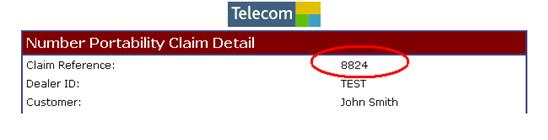
Note that a reference number has been generated. Make a note of that number as you may need it later.
- Prepaid / Postpaid /Landline. Select the connection type the customer is transferring from.
- Is this a Postpaid Winback Claim? Indicate yes or no accordingly. If "Yes", then the SIM card number field becomes mandatory. Selecting “Yes” will automatically create a winback claim registration.
- Current Provider: Select from the drop down box. If the carrier is "Other" then enter the name of the carrier in to the account number box.
- Account Number: For the customer's billing account number from the losing network, if they were on a postpaid connection
- Line Number: Select the CORRECT prefix, then the number being transferred. Mobile numbers may be 6, 7, or 8 digits long. Landline transfers will always be 7 digits long.
- Handset IMEI number: Only required if the losing network connection was postpaid.
- SIM card number. Only required if this is also a winback claim. SIM cards are 12 or 16 digits long.
Click "Add"
The details will transfer to a table further down the page. For multiple connections for the SAME CUSTOMER you may enter additional details on the same form. These can be a mixture of winback or non-winback as required. Remember to click "Add" after each set of details is entered.
Click "Finish"
Should a message appear to say "you haven't entered any data" then go back and check that you clicked "Add" after entering the details.
Page 3- Print Form.
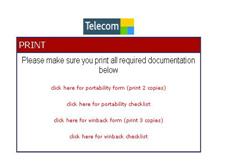
A message box will appear to tell you what to print. Click each line in turn and the form will display in a new window. Scroll down to the bottom of the form screen and click "Print this page". Choose your printer and select tag heuer replica watches 2 copies then print. Note that there are options to produce the form as a pdf and to print the checklist.
Print three copies of the winback form. (If it is a winback claim too).
If the form window did not open, you will need to reprint the form. Click here for instructions.
